Kids Learn Letter Sounds
- 4.3
- Rating
- 50.00K
- Installs
- $2.99
- Price
 Analysis by App-foxy
I found Kids Learn Letter Sounds most useful as a focused early-literacy game rather than a broad preschool learning suite. It concentrates on one important step: helping children connect written letters with the sounds they represent. That narrow aim is a strength when a child is beginning phonics, because the activity does not need to compete with counting lessons, puzzles, stories, or a crowded collection of unrelated mini-games.
The game is made by Intellijoy Educational Games for Kids and belongs to the educational category. It is designed for Everyone, with a current version of 2.5.1 and a minimum operating-system requirement of 7.1. The app costs $2.99, so I see it as a small paid learning tool for parents who prefer a dedicated activity over an ad-supported collection.
How the current experience works for early readers
The central appeal is its simplicity. A child can spend a short session listening to letter sounds and practicing the connection between what appears on screen and what is heard. That makes it easier to use during a quiet moment at home, before preschool, or as a brief follow-up after reading a picture book. I would not treat it as a complete reading course, but it can fit neatly into the first stage of phonics practice.
You May Also Like

 Blood Strike: 2.5 Anniversary
Blood Strike’s Loadouts Turn Every Drop Into a Tactical Gamble
A close look at Blood Strike’s custom loadouts: how fast access to signature weapons reshapes its battle royale rhythm, rewards preparation, and narrows the gap between fights.

 Pandora - Music & Podcasts
Pandora’s Music Is Easy to Start, but Harder to Recover
Pandora’s strength is its low-effort path from a seed to a station. Its weak spot is how much confidence it asks you to place in connection, setup, and quiet recovery.

 8 Ball Pool
 Is Built on Rivalries, Rematches, and Routine
A close look at the rivalries, rematches, shared routines, and unanswered safety questions that turn a quick pool match into a persistent mobile community.

 Samsung Music
’s Quiet Strength Is Playing What You Already Own
Its reach comes less from spectacle than from dependable access to a personal library. That simplicity is both the app’s strongest retention engine and its ceiling.

 AccuWeather: Weather Radar
AccuWeather Review: A Quick, Clear Forecast for Everyday Decisions
For everyday plans, the best forecast is the one you can understand quickly. AccuWeather makes rain timing, radar, and local conditions easy to act on, with a few trade-offs.

 Hill Climb Racing
Why Hill Climb Racing Still Turns Crashes Into One More Run
A tiny car, a bumpy hill and one more upgrade: Hill Climb Racing keeps resurfacing because its simple chaos makes every near-miss feel personal.
More From Our News Desk
View All News


That distinction matters. Learning letter names and learning letter sounds are related, but they are not identical skills. A child may confidently recite the alphabet while still hesitating when asked what sound a particular letter makes. This game is aimed at that second problem. In my view, it works best when an adult uses it to reinforce a sound already introduced through conversation, books, or classroom work.
The store summary presents it as a sequel to Learn ABC Letters with Captain Cat, which gives the product a clear place in Intellijoy’s early-learning line. I would approach it as a follow-on activity for children who are ready to move beyond simply recognizing the alphabet. It is not necessary to turn every session into a lesson. A few minutes of attentive practice can be more useful than leaving a child to tap through it without listening.
One practical advantage is the low setup burden. There is no need to prepare flash cards, choose a worksheet, or explain a complicated game system. I can imagine opening it while waiting for an appointment or using it after dinner when a child has enough energy for a small activity but not a full lesson. The focused format also makes it easier to notice whether the child is genuinely hearing the sound or merely tapping quickly.
Parents should still stay nearby at first. Young children can learn to follow the visual rhythm of an app without understanding the learning goal. I would ask the child to repeat a sound, point to a matching letter in the room, or name a word that begins with it. That turns passive screen time into a short conversation and helps reveal whether the game is supporting recognition or only providing entertainment.
Why the narrow focus can be more useful than a large learning app
Many children’s learning apps try to cover the entire preschool curriculum. They may include numbers, colors, drawing, memory games, songs, and stories in one package. That variety can be attractive, but it also makes it harder to return to one skill deliberately. Here, the limited subject is easier to explain: this is a tool for letter sounds.
I prefer that approach when a child has a specific need. If a teacher or parent notices confusion between a letter’s appearance and its sound, a specialized activity can be less distracting than a large app with dozens of rewards and unrelated exercises. The trade-off is obvious: families looking for an all-in-one educational playground will find the scope too small.
It is also worth remembering that phonics is not learned through recognition alone. Children eventually need to blend sounds, read simple words, write letters, and understand what they read. This game can support the first connection, but it should sit beside books, spoken practice, and hands-on activities. I would be cautious about presenting it as the only reading preparation a child needs.
What the version history and product age mean in practice
The game was released on March 25, 2011, and its current version is 2.5.1. That combination tells me two things. First, it has had a long presence as a learning product. Second, its age makes it especially important to judge the current experience rather than assume it follows the design habits of newer children’s apps.
An older educational game is not automatically a poor choice. A simple phonics activity does not need constant novelty to remain useful. In fact, a restrained interface can help a young learner stay with the sound-letter relationship instead of being pulled toward elaborate animations. Still, parents who expect modern presentation, frequent content expansion, or the visual polish of a newly released tablet game may notice the difference.
The current version number is useful mainly as a practical checkpoint. Before installing, I would make sure the device meets the minimum operating-system requirement and then test the app with the child rather than relying on screenshots or the age of the product. Older apps can behave differently across devices, and a child’s comfort with the controls matters more than a long feature list.
I would also avoid assuming that the sequel label means the two games must be used together. The relationship suggests a progression in Intellijoy’s alphabet-learning range, but a child’s readiness should decide the order. If the learner still struggles to identify letters visually, beginning with a basic alphabet activity may be sensible. If letter recognition is already comfortable, a sound-focused game is likely to be the more relevant next step.
For someone who already used the earlier Captain Cat title, this sequel may feel familiar rather than radically different. That can be positive for a child who benefits from predictable routines. A familiar style reduces the time spent learning how to navigate. The limitation is that an existing user should not expect a completely new learning philosophy simply because the product is described as a sequel.
How I would introduce it at home
I would begin with a short adult-guided session. I would let the child hear a letter sound, repeat it, and then connect it to a familiar word. For example, after practicing a sound, I might look around the kitchen for an object that begins with it. The point is not to turn the game into a test; it is to move the sound from the screen into ordinary language.
A useful routine is to choose only a few letters during one sitting. Even if the app allows a child to continue, covering too much at once can blur the distinctions between sounds. Short sessions also make it easier to stop while the child is still interested. I would return later instead of pushing through frustration, especially when two sounds seem similar.
Another helpful habit is to listen for the child’s response rather than counting taps. If the child can repeat the sound but cannot identify the letter afterward, I would slow down and add physical letter cards or magnetic letters. If the child recognizes the letter but says its name instead of its sound, I would gently model the difference. This is where a parent adds value that an app alone cannot provide.
I would use the game differently for different children. A confident learner might need only occasional correction and a chance to practice independently. A child with speech or hearing concerns may need a teacher or specialist to guide the activity more carefully. The game can be a useful prompt for practice, but it should not be treated as an assessment tool or a replacement for individualized support.
Who will benefit, and who should choose something else
I think this game is a good fit for families who want a paid, focused activity for early phonics. It suits a child who already recognizes at least some letters and is beginning to ask what they sound like. It can also help a parent create a predictable five-minute routine without bringing advertisements or a large menu of unrelated content into the session.
The audience is reflected in its reach and reception: it has passed 50 thousand installs, with an average rating of 4.3 from 997 ratings and 178 written reviews. Those figures suggest an established, positively received product, but I would not use them as proof that it will suit every learner. A preschooler who dislikes repetition, needs more advanced word-building, or learns better through physical play may gain more from another method.
I would skip it if the main goal is full reading instruction. It does not replace decodable books, handwriting practice, blending exercises, or a structured classroom program. I would also look elsewhere if a child needs rich accessibility options, a broad range of difficulty levels, or a highly interactive story world. A larger modern learning platform may be better for families wanting progress across several subjects.
There is also a difference between a child who needs practice and a child who needs motivation. A focused sound lesson may be exactly right for the first child, while the second may engage more readily with songs, characters, movement, or a physical alphabet game. I would choose the tool based on the learning obstacle, not simply on the fact that it is labeled educational.
Practical trade-offs before paying
The $2.99 price is easy to understand: this is a small standalone purchase rather than a subscription-style learning environment. For a family that uses it regularly, that can feel worthwhile because the app has one clear job. The value drops if the child has already mastered letter sounds or if the family expects a large library of lessons from one purchase.
The Everyone content rating makes it appropriate for a broad family audience, but that does not mean every child will be ready for the same level of phonics practice. Age labels describe suitability in general terms; they do not replace watching the learner. I would judge readiness by whether the child can recognize several letters and is willing to imitate their sounds.
One trade-off with a specialized game is repetition. Repetition is necessary for memory, but it can become mechanical when the child is only tapping through familiar prompts. To avoid that, I would alternate app practice with real objects, picture books, and spoken examples. The app can provide consistency, while the surrounding activities provide meaning and variety.
Another trade-off is adult involvement. The game may be simple enough for independent tapping, but independent use is not always independent learning. A parent who checks understanding, corrects gently, and connects sounds to words will probably get more from it than one who treats it as a digital babysitter. That is not a flaw unique to this title, but it is particularly important in a narrow phonics activity.
I would also keep expectations realistic about progress. A child may remember a sound inside the game and still hesitate when seeing the same letter in a book. That does not necessarily mean the activity failed; it means transfer takes practice. The best test is whether the child gradually begins to notice and attempt sounds outside the app, not whether every session ends with perfect answers.
What I would watch as the product continues
Because the product has a long history and now sits at version 2.5.1, future attention should go to continued compatibility and the preservation of its focused purpose. I would rather see a stable, clear sound-learning experience than extra distractions added simply to make it appear larger. For existing users, dependable access on supported devices is more important than novelty.
I would also watch how well the app remains useful across different stages of early reading. A child may begin by identifying isolated sounds, then need support with blending and simple words. If the experience remains limited to the first step, parents will eventually need to pair it with other resources. That is perfectly reasonable, as long as the app is understood as one piece of a reading routine rather than the whole path.
For current users, my advice is to keep the app in rotation but not make it the entire lesson. Use it when a child needs a quick reminder, then follow with a book or a spoken activity. If the child is no longer challenged, move on rather than forcing continued use. If the child is still confusing sounds, repeat fewer items and provide more real-world examples.
For new users, I would install it only when the narrow goal matches the child’s needs. Check the device requirement, sit through the first session, and decide whether the child is listening and responding rather than merely pressing the screen. That small trial will tell you more than the app’s age or rating alone.
My overall view is that Kids Learn Letter Sounds remains a sensible little educational game for a specific moment in a child’s development. I like its focused purpose, modest price, and suitability for short guided practice. I would recommend it to a parent whose child is moving from alphabet recognition toward phonics, especially when a calm, dedicated activity is preferable to a busy all-in-one app.
I would not recommend buying it as a complete reading solution or expecting the breadth of a current subscription learning platform. Its best role is smaller and more practical: give the child repeated contact with letter sounds, then help connect those sounds to real words and books. Used that way, it can earn its place in a home learning routine without pretending to do more than it was designed to do.
FAQs for Kids Learn Letter Sounds
01What is Kids Learn Letter Sounds and who is it designed for?
Kids Learn Letter Sounds is an early-learning app designed to help young children recognize letters and connect them with their corresponding sounds. It is mainly suitable for preschoolers and children beginning to learn English phonics. The activities are generally simple enough for independent practice, while parents and teachers can also use the app as a supplementary tool alongside reading, speaking, and handwriting exercises.
02How does Kids Learn Letter Sounds help children learn phonics?
The app introduces letters through visual examples, spoken letter sounds, and interactive activities that encourage children to listen and respond. This combination can help reinforce the relationship between a written letter and the sound it represents. Repetition is especially useful for beginners, although children may benefit most when adults repeat the sounds aloud and connect them with familiar words outside the app.
03Is Kids Learn Letter Sounds easy for young children to use?
The app is built around straightforward interactions intended for children who may have limited reading ability. Large visual elements, simple instructions, and audio guidance make it relatively accessible for preschool learners. However, younger children may still need occasional help understanding what to tap or how to move between activities. A short supervised session is recommended until the child becomes comfortable using it.
04Does Kids Learn Letter Sounds require an internet connection or include in-app purchases?
The exact offline availability, advertising policy, and purchase options can depend on the version downloaded and the device’s app-store listing. Parents should check the current Google Play or App Store details before installing, particularly for information about subscriptions, locked lessons, advertisements, and data collection. Reviewing these settings in advance also helps ensure that children can use the app safely without accidental purchases.
05Can Kids Learn Letter Sounds replace preschool phonics instruction?
No. Kids Learn Letter Sounds is best viewed as a practice and revision tool rather than a complete phonics curriculum. It can give children extra exposure to letter sounds, but effective early literacy also involves stories, conversation, pronunciation practice, handwriting, vocabulary, and guidance from an adult or teacher. Combining the app with hands-on learning and regular reading will provide a more balanced educational experience.
Pros
- Clear phonics lessons help children connect letters with their sounds.
- Simple activities are easy for young learners to understand independently.
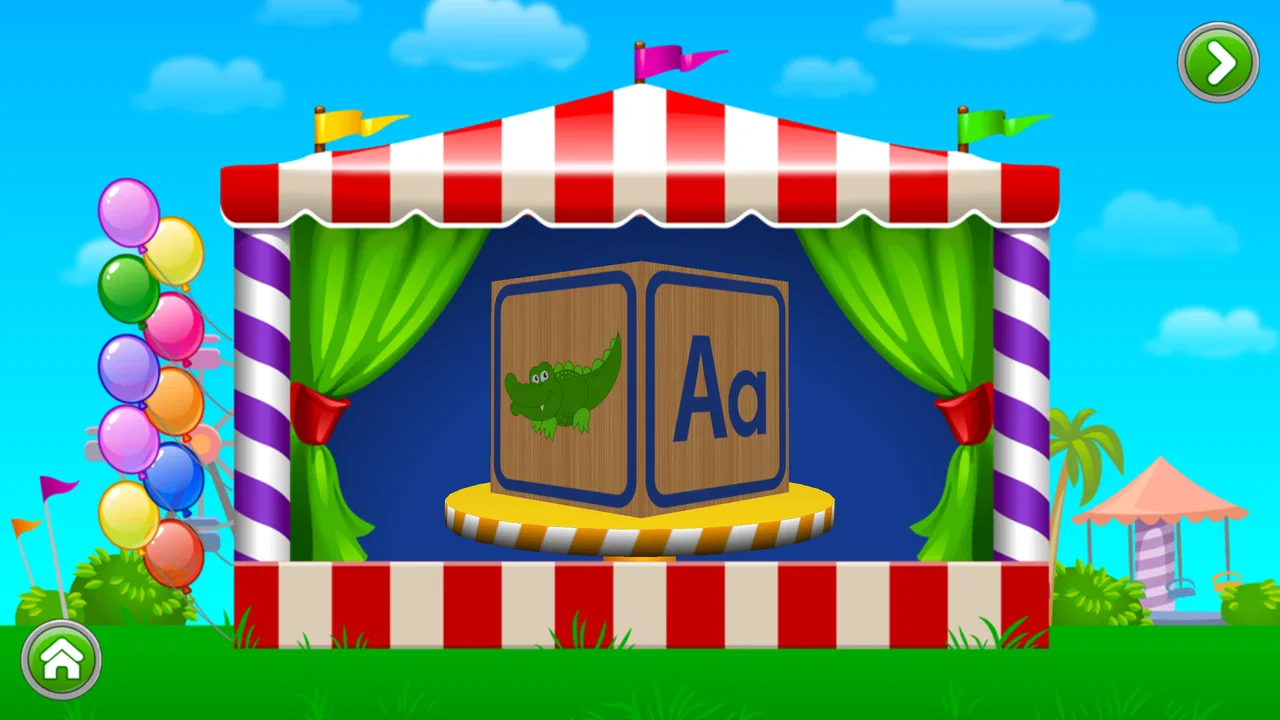
- Bright visuals and friendly audio help maintain children’s attention.
- Useful for practicing early reading skills at home or during travel.
- Suitable for beginners who are still learning the alphabet and basic phonics.
Cons
- Some activities may feel repetitive after extended use.
- Progress tracking may be limited for parents and teachers.
- Children may need help understanding certain pronunciation examples.
- The learning content may not suit older children beyond early phonics.
- Audio quality and pronunciation can vary depending on the device used.

Kids Learn Letter Sounds
Gallery